
ALT'O sensor


Presentation
The Alt'O sensor is a LoRaWAN class A sensor that uses a disposable 3.6V D-type battery (type LS33600 Saft) as power supply.
It measures the height of clearwater, brackish, saltwater, polluted water, etc... and its own inclination. It is possible to get the voltage of the power supply. Data transmission over public or private LoRaWAN® networks is carried out periodically or immediately in the event of an alert.
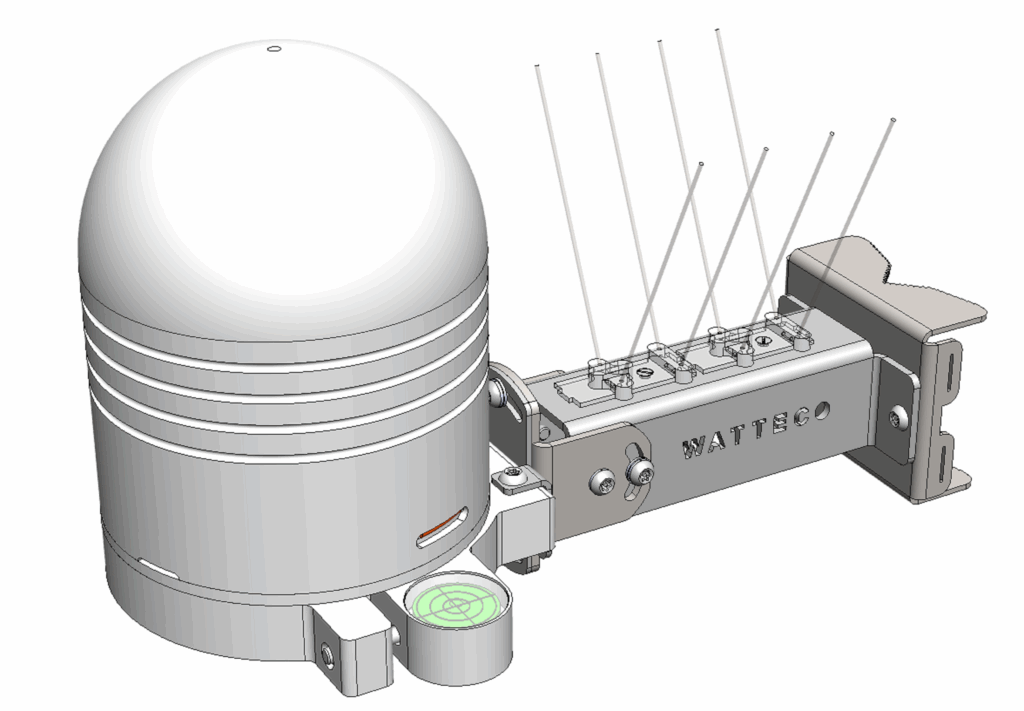
Family code / Release Note
The family code of Alt'O device is : 50-70-236-xxx
Documentation
For Quickstart instructions and device startup, please check the QuickStartGuide.
Installation and operation
Radio propagation
In order for the sensor to operate correctly, the number of obstacles should be limited in order to avoid excessive radio wave attenuation. It is also important to place the sensor as high as possible.
Dynamic measurement period
The sensor manages 3 measurement periods. Thus, as long as the distance between the sensor and the water surface remains within defined minimum and maximum limits, the measurement rate is standard. If it increases and exceeds the maximum value, then the rate slows down and the water level measurements are spaced out ; conversely, if it decreases and goes below the minimum threshold, then the rate accelerates.
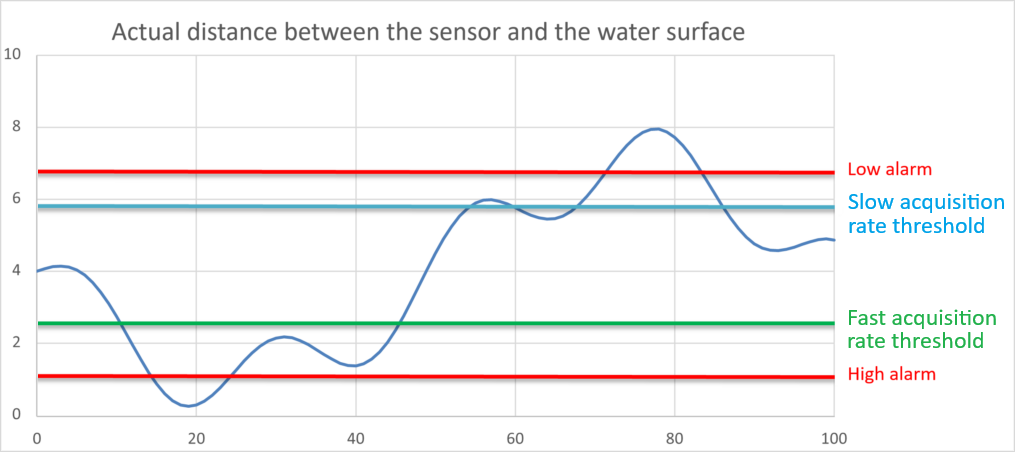
N.B.: Alarm thresholds are decoupled from the thresholds for changing the measurement rate.
Radar signal magnitude
The reported magnitude indicates the quality of the received radar signal:
- Between ~65 and 100 (Green zone), the received radar signal is good to very good.
- Between ~50 and ~65 (Blue zone), the radar signal is fair, but the data may be a bit noisier.
- Below ~40 to 50 (Yellow zone), the sensor will have difficulty providing reliable data.

Possible reasons:
- Excessive height (> 8m). To be confirmed depending on the installation location.
- Insufficient height: 30cm minimum.
- A surface that is periodically or temporarily not liquid.
On non-liquid surfaces, the reflected signal may be partially absorbed by the medium or scattered in multiple directions, reducing the power of the wave received at the sensor. In this case, using a flat rock or a stainless steel plate placed perpendicular to the sensor helps restore a good signal-to-noise ratio. For example: place a rock with a diameter of approximately 40cm for a sensor installed at 3m.
Measure errors
If a measurement cannot be performed, the sensor may return an error. This error replaces the magnitude value with the following error codes:
| Error code | Description |
| 1, 2, 3 | Internal error. For this measurement, the sensor encountered activation failures in some of its functions. |
| 4 | Measurement error. The sensor is unable to obtain a sufficient signal-to-noise ratio. This may be due to the nature of the target surface (see Signal magnitude). |
| 5 | Measurement error. The sensor is unable to focus on a specific distance. The distance is too variable. This may be due to the nature of the target surface (see point above). |
| 6 | Multiple errors: The sensor is experiencing difficulties taking measurements. |
Autonomy
The information in the table below represents how long the battery can last. It is based on the default configuration at ambient temperature (+25°C) within the optimal operating range of the sensor via a LoRaWAN network (one uplink frame), when the spreading factor used is SF12.
The disposable battery has a 17Ah capacity, of which 85% is used.
| Transmission and Measure periodicity | Spreading Factor | Battery Life |
| 20 min / 20 min (average) | 12 | 5 years |
| 20 min / 20 min (average) | 10 | 6 years |
Human Machine Interface
The Alt’O sensor has a buzzer that allows it to “communicate” with the user.
A reed switch is available on the side of the sensor during (at the left side of the at the level of the Gore-Tex tab). It is possible to use a magnet to activate it and makes specific actions on the sensor (Switch off, switch on, Re-associtation…). When the reed switch is activated, the buzzer rings quickly.
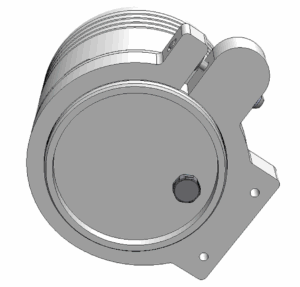
To Start-up the device, it is necessary to put a magnet on the side of the sensor during one second. The buzzer rings quickly during this step. After this second, the buzzer stops and rings slowly until the association is done.
Note: On startup with the magnet, the sensor’s inclination (tilt) is set to zero for its current position.
To switch off the device, use the same way by putting the magnet during 5 seconds. After this amount of time, the device rings 5 times slowly.
The table below describes the actions to be performed on the reed switch to disable or enable the storage mode.
| Switch ON (disable storage mode) | 1 second | |
| Switch OFF (enable storage mode) | 5 seconds |
When the sensor is trying to associate with a network, it emits the following sound:
Once the association is completed, the buzzer makes the following sound:
A reed switch (or magnetic switch) is available. A magnet can be used to activate it and perform specific actions on the sensor (switch off, switch on, reassociation…).
- Configuration: "void" frames are sent every minute for 10 minutes.
Standard reports are disabled in this mode.
| Way to trigger it | One passage of the magnet near the reed switch or specific ZCL command |
| Way to stop it | Another passage of the magnet or specific ZCL command |
| Effects on the sensor | |
| Duration | The configuration mode lasts 10 minutes |
- A reassociation procedure can be requested if no downlink frame is received by the sensor during a given periodicity (4 days by default) or if a given number (100 by default) is reached or in case of failure (no acknowledgement received) by sending an applicative frame to the sensor or via the sensor’s IHM.
The sensor keeps the AppEUi and DevAddr configured, Confirmed/Unconfirmed configuration and all applicative configurations. However, LoRaWAN configurations (channel, data rate…) are lost
| Way to trigger it | Three passages of the magnet near the reed switch or ZCL command from LoRaWAN cluster. |
| Effects on the sensor | |
- A factory reset is available on Watteco’s sensors. It deletes all the applicative settings saved in the flash memory (i.e. configured batches and reports will be deleted).
The sensor keeps the AppEUi and DevAddr configured. However, LoRaWAN configurations (channel, data rate…) and applicative configurations are lost.
| Way to trigger it | Two quick passages and a very long passage (until the sensor rings for the reset) of the magnet near the reed switch |
| Effects on the sensor | |
Applicative layer
Codecs are available to decode frames: Downloads
or Easy codec or Online codec
The Alt'O device integrates the following clusters:
| Cluster | Cluster name | Managed attributes |
|---|---|---|
| 0x0000 | Basic | All |
| 0x0050 | Configuration | All |
| 0x8004 | LoRaWAN | All |
| 0x000C | AnalogInput EP0 (0x11): Vertical angular displacement (°/100) EP1 (0x31): Measured distance (m) | All |
| 0x800E | Number (U16) EP0: Reserved EP1 (0x31): Magnitude of Measured distance (Quality indicator/100) | All |
Default configuration
A specific default configuration is provided, compliant with the "One Frame Configuration" feature of recent watteco sensors and easily updated by Easy codec. This default setup enables distance measurement and reporting with three distinct periods, determined by two threshold levels. The device reports as follows:
- A "Batch frame" reported at current "Distance measurement period" that contains:
- Distance (m) [Measured sent at current Distance measurement period]
- Magnitude (quality indicator) [Measured and stored and sent at current Distance measurement period]
- Tilt (°/100), [Measured every minute sent daily or whenever the tilt changes by more than 0.1°]
- Battery voltage [Measured every 30 minutes, sent daily or if measurement is changed of more than 200mV]
- Three complementary "Standard Frames" report alarms when two additional distance thresholds are crossed (either upward or downward).
The default "batch" frames can be decoded with following arguments:
3 0,1,6,ACCmg 1,0.1,12,Ang 2,0.001,12,Dist 3,1,6,Magn 4,1,6,VBatt 5,0.1,7,AccTemp .
Notes:
-
Configuration Method: EasyCodec is recommended for making configuration changes. However, advanced users may also utilize custom frames.
-
Regulatory Compliance: Any modifications to the default configuration must adhere to the legal duty cycle. For example, the most restrictive duty cycle in the EU is 0.1%, which allows for approximately 1 frame per hour with SF12.
-
Reserved Report Labels: Batch report labels 0 (ACCmg) and 5 (AccTemp) are not used in the default configuration. These slots are reserved for specific use cases if needed.
Frame examples
All Downlink frames have to be sent on port 125
Batch and standard frames below can be decoded wih our online codec.
Report
Batch report Applicative payload is: 361200800a2400000000ed66e5b37bdeb67d45c902 {
Decoded frame:
"batch_counter": 2,
"batch_relative_timestamp": 6046,
"batch_absolute_timestamp": "2023-12-27T09:09:18.000Z",
"dataset": [
{
"data_relative_timestamp": 5448,
"data": {
"value": 0.0,
"label": 1,
"label_name": "Ang"
},
"data_absolute_timestamp": "2023-12-27T08:59:20.000Z"
},
{
"data_relative_timestamp": 6045,
"data": {
"value": 0.367000013589859,
"label": 2,
"label_name": "Dist"
},
"data_absolute_timestamp": "2023-12-27T09:09:17.000Z"
},
{
"data_relative_timestamp": 6045,
"data": {
"value": 5413,
"label": 3,
"label_name": "Magn"
},
"data_absolute_timestamp": "2023-12-27T09:09:17.000Z"
}
]
}
